Reset forgotten Teacher Portal Ghana password & email
For some reason, some teachers who registered on the Teacher Portal Ghana cannot access their dashboards on the portal. Follow the steps below to reset the forgotten Teacher Portal Ghana password & email now.
Kindly take note that the GES has extended the registration period indefinitely.
Again, the service has directed all qualified in-service teachers to visit the Teacher Portal Ghana https://tpg.ntc.gov.gh/ to register for the NTC teaching license.
Read: When are SHS2 Green track students reopening school?

WANT TO PASS 2027 BECE? REGISTER FOR BECE HOME MOCK
Register your ward for Ghana's premier Home Mock service, active since 2022.
REGISTER YOUR WARD NOWReset forgotten Teacher Portal Ghana password & email
1. Using an internet-connected computer or laptop visit the portal by clicking >>>> UPDATE MY RECORDS NOW
2. Enter your email address (The one you used for the registration)
3. Click “Send reset link”

4. Check your email for a message from NTC TPG
5. Click on it and follow the instructions to reset your password
How to reset forgotten Teacher Portal Ghana email and password
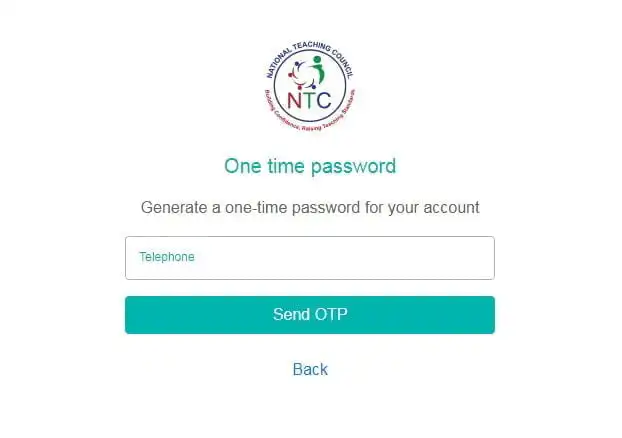
According to NTC, If you have forgotten both your password and email, you can use your telephone number to recover your account.
1. Using an internet-connected computer or laptop visit here
2. Enter your telephone number (The one you used for the registration)
3. Click “Send OTP”
4. An OTP will be sent to you within 15 minutes
5. After receiving your OTP go back to https://tpg.ntc.gov.gh/acc…/send-one-time-password/teacher and enter your telephone number again
6. A field will be made available to you to enter the OTP code
7. Enter the OTP code sent to your telephone and submit
8. Once your account is opened, click “Reset password”.
9. Click “Change email” to change the email of the current account to a new one so you can use that to login
10. Click “Update account password” to update the password of the account.
11. On your next login, use your new email and password to login
Read: When are SHS2 Green track students reopening school?