Why WhatsApp Bans Numbers & How to restore banned WhatsApp number

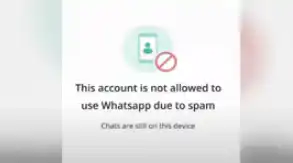
WhatsApp can ban your account on its business or personal app if you keep sending spam chats to contacts that are not saved as your contacts. Very often, such persons will report you to WhatsApp if they do not like the messages you keep forwarding to them. This can lead to WhatsApp banning you and sending you a message like “This account is not allowed to use WhatsApp due to spam. Chats are still on this device”. If you fail to follow the community guidelines, you will surely be banned on WhatsApp before you know it.
Why WhatsApp Bans Numbers: 6 Reasons Why WhatsApp Will Ban Your Account
Our research from WhatsApp’s Community Guidelines revealed the following information, which is accessible from their WhatsApp Community Guidelines

They outlined practices to avoid, so you are not banned. Using WhatsApp in any of the ways listed below may cause your account to be banned.
- Unwanted messages: You should delete a contact from your address book and desist from communicating with them further if they urge you to stop.
- Automated or bulk messages: WhatsApp should not be used for bulk messaging, auto-messaging, or autodialling. WhatsApp detects and blocks accounts that send unwelcome automated messages by using machine learning technologies as well as feedback from users. Additionally, avoid using customized versions of WhatsApp as well as unapproved or automated methods to establish accounts or groups. To learn more about WhatsApp’s safeguards against automated and mass message misuse,
- Using contact lists that aren’t yours: Don’t distribute phone numbers without permission, and don’t use data obtained from illegal sources to contact or add members to groups on WhatsApp.
- Over-using broadcast lists: Users can only receive messages sent using a broadcast list if they have added your phone number to their contact list. Please be aware that sending broadcast messages frequently may cause some users to report your messages, and we prohibit accounts that get repeated reports.
- Harvesting personal information: Avoid mass data extraction from WhatsApp using either an automated or manual technique for any illegal reasons. It is against our Terms of Service to collect user data in this manner, including phone numbers, user profile images, and status updates from WhatsApp.
- Violating our Terms of Service: As a reminder, among other things, our Terms of Service forbid posting lies and acting in ways that are unlawful, threatening, intimidating, or that are racially or ethnically insulting. Here are the terms of service for this on WhatsApp
If you have this kind of problem, follow the effective guide below to get your banned WhatsApp account restored within 24 hours.
WANT TO PASS 2027 BECE? REGISTER FOR BECE HOME MOCK
Register your ward for Ghana's premier Home Mock service, active since 2022.
READ: [VIDEO] How To Recover & Read Deleted Messages On WhatsApp
When you are banned due to sending spam messages to other WhatsApp Users, the message you get is. “This account is not allowed to use WhatsApp due to spam. Chats are still on this device”

How to restore banned WhatsApp number
To do that, clear your WhatsApp app data by doing the following
- Go to the app icon
- Go to the three dots in the right top corner and click on it
- Click on settings
- Click on help
- Click on App info
- Click on the clear data option
- Go back to your app icon and click
- Choose your original Language, e.g. English
- Click on Privacy policy link on the new page
- Look for and click the contact us link
- Choose “I need help with my WhatsApp Account
- Click on the link (Article) attached to “If your account was banned” to continue.
- Scroll and find the Email us to request a review link and click it to proceed.
- Click in the first contact us link if your account was a normal personal messenger. If your banned account is a business WhatsApp, then click the second link to proceed
- Now enter your WhatsApp details such as phone number, platform you are using the device on such as android, etc. Do not forget to explain the issue to WhatsApp in the space provided.
- After meeting all the requirements, click Send Questions on the right of the end of the page
READ: WhatsApp Security: 8 Ways to Keep Your Chat App Safe from Hackers
Wait for 24 hours for a favourable or bad sad response from WhatsApp. Very often, your banned account will be restored if your issue is not serious or else, you will no longer be able to use WhatsApp on the said number.