How to Type Ghanaian Language with Keyboard Shortcuts without Software

Teachers, secretaries, typists, and anyone can type any document in any of the Ghanaian languages without installing software.
Download a sample MS word document at the end of this tutorial once you understand how the procedures below work.
You do not need Ghanaian language and French typing software to start typing your documents.
By using shortcut keys from Ms. Word, any keyboard can type Ghanaian language letters or characters as and French using the standard keyboard.
Follow the simple steps below to transform your desktop computers and laptop keyboards without installing any software.
To do this, follow the procedure below. The procedure explained here will have to be followed just once to convert any keyboard into a super Ghanaian language keyboard.

1. Open a new Word document and save it with a name, e.g. Ghanaian language keyboard.

2. Write all the letters in the given language you want to type that are not directly available on the standard keyboard in an exercise book. One letter per line.

3. Go to Insert on the top home key/ page of the Word document you have opened.

4. Look for Symbol at the far right, click on it then on More Symbols to reveal all available symbols

5. You will see an interface like the one shown below


6. Scroll through to look for the special characters needed for typing in French or Ghanaian language.
7. Assuming you are looking for the character “ɛ” when you see it, click on it
8. Click on the button “Shortcut key to create a key that will enable you to type the same letter each time you want to.

9. Now type a key into space Ctl+3
10. Go to the drop-down button with the labeled “Save changes, select the document in which the code should work. In this case, it has been saved in the Ghanaian Language keyboard.
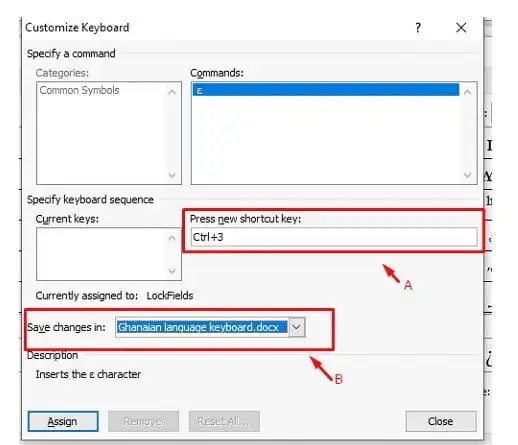
Hence each time the short key Ctrl+3 is typed in this document, it will return the letter ɛ
By following this method you can create all the short keys for the letters you need to type in any Ghanaian language or French
.
Find below ten short keys created into this word page for your easy typing in French and Ghanaian language without any software installation.
Short keys for typing specific letters/ characters embedded in the attached MS Word for your download and use.
Also read: Dr. Kwadwo Ye-Large writes: The Future of the Current Basic Education is Blur
Ctrl+3 = ɛ (Small letter)
Ctrl+ E = Ԑ (Capital letter)
Ctrl+V in Ewe = ʋ (Capital letter)
Ctrl+o = ͻ (Small letter)
Ctrl+0 = Ͻ (Capital letter)
Ctrl+ M = ɳ (Ewe letter –small)
DOWNLOAD MS WORD DOCUMENT FOR TYPING GH. LANGUAGE AND FRENCH
Try the method used to assign the shortcut keys and introduce other letters and characters.
Do well to save the letters and characters using the name you created for the document.
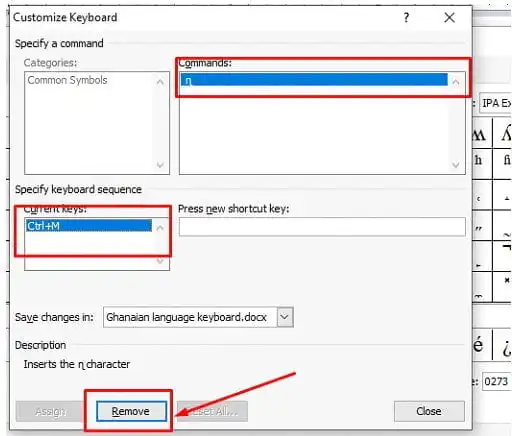
Failure to do that will lead to your keyboard making such letters show on other documents each time you type the short key anywhere in Ms. Word.
That can, however, be corrected by going to the symbols section to remove or delete the short cut as shown in the image below.
We hope this solves the problem of looking for software to install before typing documents in various Ghanaian languages and French.
Source: Ghanaeducation.org