How to Join Your Favourate Multiple WhatsApp Channels
Meta, the owners of WhatsApp, have officially announced that its new WhatsApp Channel Feature is now available and accessible in over 180 countries globally. This was confirmed by WhatsApp in a Tweet sighted by the Tech Desk of Ghana Education News.
How To Join Your Favourate Multiple WhatsApp Channels
The big question is how to Join Multiple WhatsApp Channels via your mobile device or WhatsApp Web.
If you have a WhatsApp account, make sure it’s updated to the latest version. This will ensure that you are able to access the new feature on your devices
To join one or more WhatsApp Channels, follow the procedures outlined here.
WANT TO PASS 2027 BECE? REGISTER FOR BECE HOME MOCK
Register your ward for Ghana's premier Home Mock service, active since 2022.
REGISTER YOUR WARD NOW#1. To access the feature, go to the update section of your app and update it.
#2. After updating, you should see all the channels available.
#3. You can choose the country you prefer and the channels available will pop up.

Note that the channels are diverse – This includes Sports clubs, Celebrities, Businesses, and Organizations, News Portal such as BBC, and CNN among others.
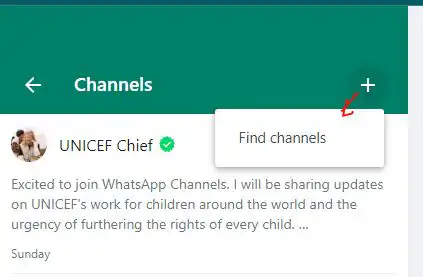
#4. Click on the new Channel Icon as circled below or the + (plus) icon to proceed.
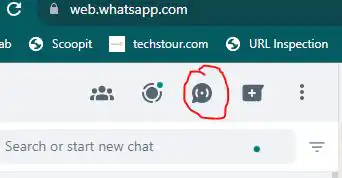
#5. This will open up the Find Channel space bar for you to type the channel name
This will also reveal channels to you however, you can type the name of the channel you want. An example is Liverpool
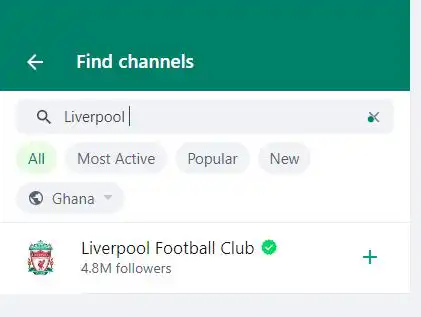
#6. After the name of the channel pops up, click on the + icon to the right of it to join the channel.
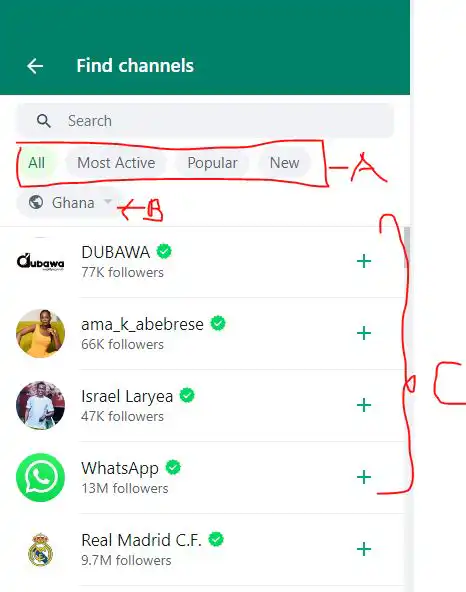
Apart from using the above method to find a channel on WhatsApp, you can also choose from available options such as All, Most Active, Popular, and New to see channels that have been classified under these options. This is labeled A in the image below.
Again, you can choose the location or country of the channel by using the drop-down menu for countries labeled B in the image below.
However, you can also decide to scroll through the channels labeled below the above-described options and click on the + button to join the channel.
READ: How to Create WhatsApp Channel: WhatsApp Channel Feature Officially Avaiblable in 180 countries
How to Create a WhatsApp Channel
- Open WhatsApp on your phone, and go to the Updates tab.
- Tap

, and select Create Channel.
- Tap Get Started and continue through the onscreen prompts.
- Add a channel name to finish creating your channel. You can choose to change the name again at any time.
- Customize your channel: You can choose to customize your channel now by adding a description and icon or wait until later.

- Add a channel description: Write a few words to help potential followers understand what your channel is about.
- Add a channel icon: Add an image from your phone or the web to stand out.
- Tap Create Channel, and you’re done!
- Open Channels by clicking the Channels icon.
- Click your channel, and then your channel name.
- Click Copy link.
We hope this post on how to join Multiple WhatsApp Channels and also create channels have neen useful.