How to Check WASSCE Results Online in Ghana — Complete WAEC Results Checker Guide
by Wisdom K.E Hammond · August 21, 2026
Waiting for your WASSCE results can be stressful, especially when you are preparing for university, college, or other tertiary admission.
The good news is that checking your WASSCE results online is relatively simple. You first need a result checker from https://waecghresultscard.com/
Once WAEC has released the results and you have a valid results checker voucher, you can check your grades through the official WAEC Ghana results portal.
The official online results checker requires your examination details and the information printed on your results checker voucher.
Where can I check my WASSCE results?
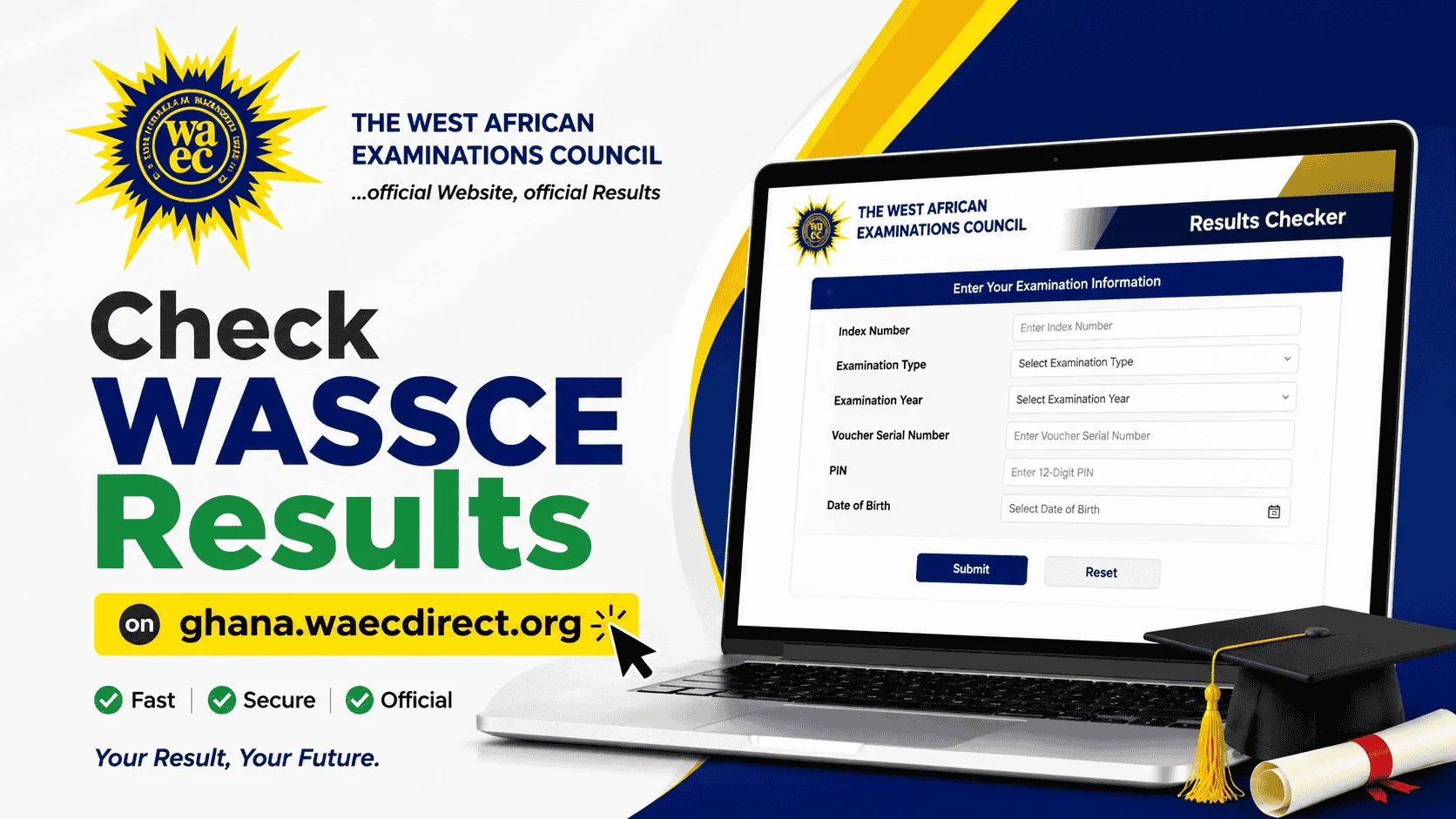
To check your WASSCE results online, visit: ghana.waecdirect.org
Make sure you are using the correct WAEC results-checking website. Be particularly careful with websites or individuals asking you to provide your WAEC PIN or promising to change your grades.
What do I need to check my WASSCE results?
Before opening the results checker, have these details ready, you first need a result checker from https://waecghresultscard.com/
- Your WASSCE Index Number
- Examination Type
- Examination Year
- Voucher Serial Number
- Your 12-digit Results Checker PIN
The official results checker contains fields for these examination and voucher details. Depending on the examination being checked, the portal may also request additional information, such as a date of birth.
Having everything available before you start will make the process much easier.

How to Check WASSCE Results on ghana.waecdirect.org
Follow these steps carefully. You first need a result checker from https://waecghresultscard.com/
1. Open the WAEC results checker
Using your phone, tablet or computer, open your internet browser and go to:https://ghana.waecdirect.org/
This is the online portal used to check WAEC examination results.
2. Enter your Index Number
Type your WASSCE Index Number into the Index Number field.
Check every digit before moving to the next section. An incorrect Index Number can prevent the system from finding your examination record.
3. Select your examination type
Choose the examination you took.
If you are checking the results of the WASSCE for school candidates, select WASSCE where applicable.
4. Choose your examination year
Select the year in which you wrote the examination.
For example, candidates checking the 2026 WASSCE results should select 2026 when that examination year is available on the results checker.
5. Enter the voucher Serial Number
Locate the Serial Number on your results checker voucher and enter it in the appropriate field.
Be careful when typing the number. A single incorrect digit can cause the verification process to fail.
6. Enter your 12-digit PIN
Enter the 12-digit Personal Identification Number (PIN) printed on your voucher.
For example:012345678912
Treat your PIN as confidential information. Do not post it on social media or send it to people you do not know.
7. Confirm your details
Before submitting the request, carefully check the information you have entered.
Pay particular attention to:
- Your Index Number
- Examination Year
Make sure they correspond to the examination result you are trying to access.
8. Click Submit
Once you are satisfied that everything is correct, click Submit.
Your result should appear in a pop-up window. The system may take several minutes to process and display the result, so do not panic if it does not appear instantly.
Why Is My WASSCE Result Not Showing?
There are several reasons a result may not immediately appear.
Start by checking the information you entered. Confirm that your:
- Index Number is correct.
- Examination type is correct.
- Examination year is correct.
- Voucher Serial Number is correct.
- PIN is correct.
- Internet connection is working.
These are the first things candidates should check when experiencing difficulties with the online result checker.
If everything is correct and the problem persists, use the official WAEC support channels rather than handing your examination details to someone claiming they can “fix” the problem.
Can I Check WASSCE Results Without a PIN?
No, not through the normal online results-checking process.
You need the required voucher information, including the Voucher Serial Number and PIN, to check your result online.
This is why candidates should obtain a valid results checker voucher before attempting to access their results.
What Happens If My WASSCE Result Is Withheld?
A withheld result should not automatically be interpreted as a cancelled result.
WAEC may withhold results where there are examination-related issues or suspected irregularities that require attention or investigation.
Candidates should wait for official information from WAEC instead of relying on social media rumours or people claiming to have inside information.
And there is one particularly important warning:
Nobody should be trusted if they claim they can upgrade, change or manipulate your WAEC grade for money.
WASSCE Result Checker Problems and What to Do
“Invalid Index Number”
Check your Index Number carefully. Also make sure you selected the correct examination year.
“Invalid PIN”
Check the PIN printed on your voucher and enter it again carefully. Make sure you have not entered a digit incorrectly.
The result page is not opening
Your internet connection, browser or the result-checking system could be responsible. Check your connection and try again.
The result checker is taking too long
Give the system some time. WAEC’s instructions indicate that displaying a result can take several minutes.
Someone says they can fix my result
Be extremely careful.
Do not give anyone money because they claim they can change your WAEC grades. If you believe there is a genuine problem with your result, use official WAEC channels.
WASSCE Results: Myths vs Facts
Myth: Someone can upgrade my WASSCE grade.
Fact: Be suspicious of anybody making this promise. Candidates should not pay individuals claiming they can manipulate their WAEC results.
Myth: Every website that says “WAEC results checker” is an official WAEC website.
Fact: No. Always check the website address before entering your Index Number or PIN. The official online checker is ghana.waecdirect.org.
Myth: If my result doesn’t appear immediately, WAEC has cancelled it.
Fact: Not necessarily. Incorrect details, technical problems and processing issues can all prevent a result from appearing immediately.
Myth: Result checking and result verification are the same thing.
Fact: They are different.
Candidates use the result checker to access their results. Institutions and organisations use result verification services to authenticate examination results.
Frequently Asked Questions About WASSCE Results
What website should I use to check my WASSCE results?
Use the official WAEC Ghana online results checker:
ghana.waecdirect.org
What information is required to check WASSCE results?
You need your Index Number, Examination Type, Examination Year, Voucher Serial Number and 12-digit PIN. Some examinations may require additional information.
Can I check my WASSCE results with my name?
The online checker requires examination information, including your Index Number. It does not provide a name-only search option.
Can I check my WASSCE results using my phone?
Yes. You can access the online results checker through a mobile browser, provided you have internet access and the required information.
How many digits does the WASSCE results PIN have?
The results-checking instructions specify a 12-digit PIN.
Can I check my result again after viewing it?
If you need to access your result again, return to the official results checker and follow the instructions. Keep your voucher information secure.
What should I do after checking my WASSCE results?
Keep a copy of your results for your records and proceed with the admission or application process required by your chosen tertiary institution.
Where Can I Buy a WASSCE Results Checker?
Candidates who need a results checker voucher can obtain one from a trusted and authorised source.
Important: Always make sure that the voucher you purchase is valid before making payment.
The supplied information for this article identifies waecghresultscard.com as a source for purchasing results checker cards.
Final Word for WASSCE Candidates
Checking your WASSCE results online does not have to be difficult.
Have your Index Number, examination details and valid results checker voucher ready. Visit ghana.waecdirect.org, enter the information carefully, confirm your details and submit the request.
If your result does not appear immediately, don’t assume the worst. Check your information, give the system time to respond and use official WAEC support if the problem continues.
Most importantly, keep your results checker PIN private and do not pay anyone who promises to manipulate or upgrade your grades.
Official results checker BUYING PORTAL: https://waecghresultscard.com/