How to reduce laptop internet data usage and save data

If you are wondering why your internet data runs dry so quickly, read this guide on how you can reduce laptop data usage when using and spend less for more data.
Data is the fuel for staying online however if you fail to do the things we share in this post, you will keep buying data all the time.
How to reduce laptop internet data usage and save data
a. The first way to reduce data misuse and over-usage is to disable updates if you don’t want them. This works for laptops that operate using Windows 7 or Windows 8
b. Use a data saver extension in Chrome or Firefox to minimize the data used by your laptop to access information on the internet.
c. You can also reduce data misuse by opening up Task Manager (Ctrl+Shift+Esc) and ending unwanted programs and services.
If you are using Windows 10 follow these simple steps to reduce internet data usage in a laptop
#1. Hold Win+R
#2. Type : services.msc
#3. Scroll down to the bottom and search for ‘Windows update’

#4. Right-click ‘Windows update’ > Properties
#5. Click on stop.
#6. Select startup type as disabled and click on apply > OK.
By following this procedure, you would have successfully disabled Windows 10 updates. Note that Windows 10 update consumes most of your data. By turning it off, you save more data for other important things.
For those using win8 +, we recommend that you go to Wi-Fi settings and set your connection as metred connection.
Follow the simple steps to achieve that as follows.
Step 1: Launch the Windows Settings menu.
Step 2: Select ‘Network & Internet’ option.
Step 3: In the Status section, Windows will show you the network your PC is currently connected to (could be Wi-Fi or Ethernet). To change the network status to metered, tap ‘Change network properties’ option.
Step 4: Scroll to the Metered connection section, and if the ‘Set as metered connection’ option is toggled off. Flick it on.
READ: How To Make Money Online In Ghana As A Student
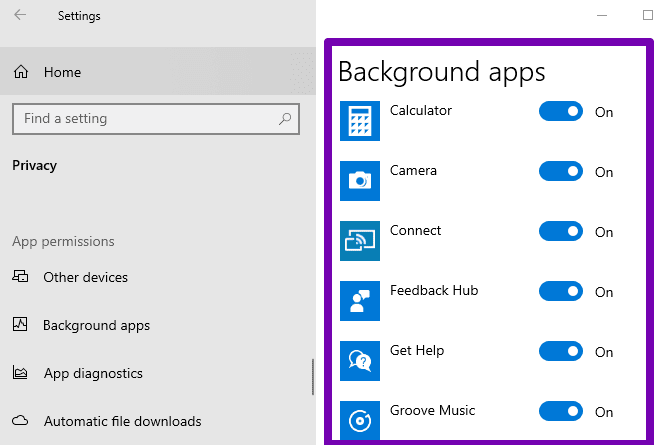
You can reduce internet data usage by turning off your background apps.
Step 1: Launch the Windows Settings menu.
Step 2: Select Privacy.
Step 3: Scroll to the bottom of the left-hand section and select Background apps
Step 4: Tap the ‘Let apps run in the background’ option to toggle it off and disable background apps.
Step 5: Scroll to the ‘Choose which apps can run in the background’ and turn off apps you don’t want running in the background.
There is no doubt that by taking these steps into consideration, you will begin to see your data last for long while using your Laptop to access the Internet. This will give you improved value and save you money as well.
Share this content with others to help them save on excessive use of data. This was, we can all save on internet data.