How to Register and Pay for IELTS Exams in Ghana Using Mobile Money
Taking the IELTS test in Ghana no longer requires a tedious trip to the bank or owning a foreign credit/debit card. To make the process highly accessible, the British Council allows candidates to complete their registration online and pay directly from a mobile money wallet (MTN Mobile Money, Telecel Cash, or AT Money).
However, because these slots are highly competitive across Accra and Kumasi, network delays or insufficient wallet balances can cause your registration link to expire before the transaction completes.
This comprehensive guide walks you through the step-by-step process of registering for the IELTS and securely pushing your Mobile Money payment through without errors.
Current British Council IELTS Fees in Ghana
Before initiating your registration, ensure your mobile wallet contains the exact test fee. Keep in mind that mobile telecom operators apply network transaction charges, and statutory electronic levies (e-levy) may apply depending on your wallet setup.
Never fund your wallet with the exact fee alone. Always maintain an extra GHS 150 to GHS 200 buffer in your wallet to comfortably cover platform transaction fees and network service taxes. If your total balance matches the test fee to the exact pesewa, the transaction will fail instantly due to insufficient funds for network charges.
Step-by-Step IELTS Registration & Mobile Money Payment Sequence
Follow this exact workflow to register your account and complete your payment within the system’s active session time limit.
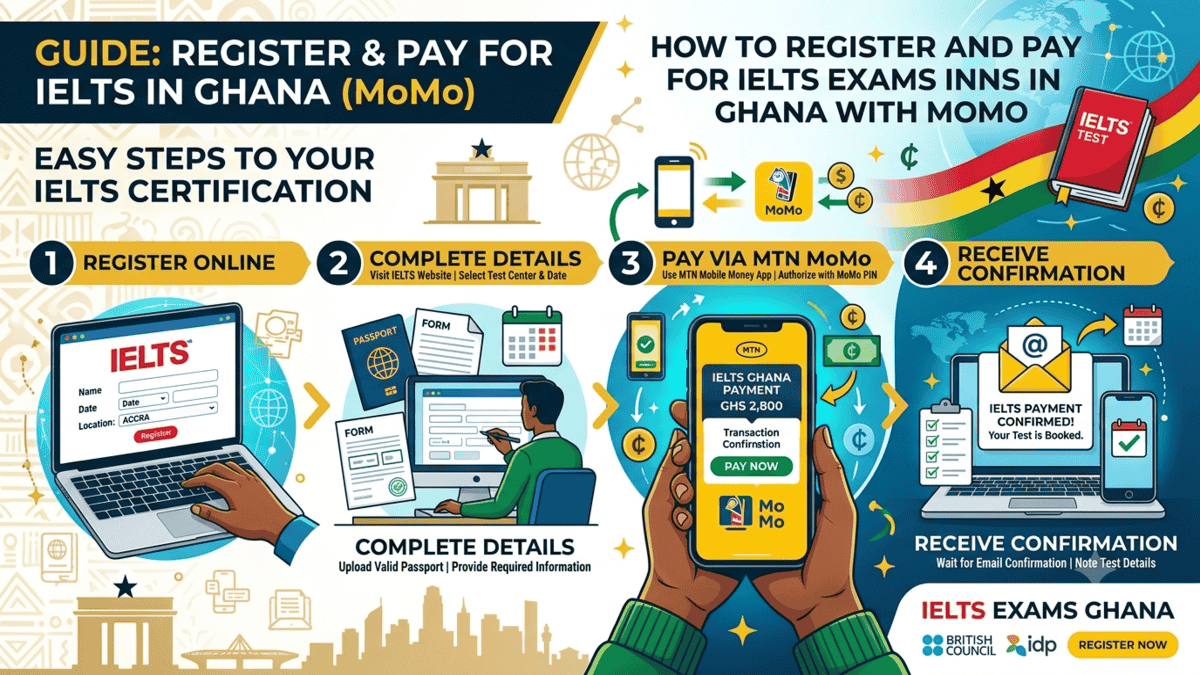
Go to the official British Council Ghana registration portal. Choose your preferred test format (Computer-delivered or Paper-based) and select your town or city (Accra or Kumasi). Click on an open test date that fits your timeline.
Fill out your personal profile using your official name exactly as it appears on your identity document. Upload a clean, high-resolution color scan of your valid Passport data page. Please note: Ghana Cards, student IDs, or driving licenses are strictly rejected by the British Council for IELTS identification.
When prompted on the payment options page, do not select bank draft or offline transfer. Select “Pay Online Now”. Review your order details, choose the Mobile Money gateway option, and click proceed.
Select your mobile service provider (MTN, Telecel, or AT) and type in your active wallet mobile number. Keep your mobile phone unlocked in your hand. Within a few seconds, a secure USSD pop-up prompt will appear on your phone screen asking you to enter your Mobile Money PIN. Enter your PIN immediately and tap approve.
READ: How To Buy 2026 Term 3 Exam Questions and Answers
Local Troubleshooting: Resolving Mobile Money Payment Errors
Because of network traffic variations across Ghanaian telecom infrastructure, you may encounter unique gateway issues. Use these local workarounds to secure your booking:
1. What if the USSD PIN Prompt Does Not Pop Up?
If your browser says “Waiting for authorization” but your phone doesn’t display the PIN screen:
MTN Users: Do not refresh your browser. Manually dial
*170#, go to Option 6 (My Wallet), select Option 3 (Approvals), enter your PIN, and check for the pending British Council payment request. Approve it right there.Telecel Users: Ensure your cash voucher code is generated beforehand if using old processing methods, or check your transaction approval dashboard by dialing
*110#.Browser Tip: If the system completely times out, switch your browser from Google Chrome to Microsoft Edge or Mozilla Firefox. Local payment gateways often experience script blocks on standard mobile Chrome setups.
2. The “Double Debit” or “Status Failed” Glitch
On rare occasions, your telecom operator will send an SMS alert confirming that money has been deducted, but the British Council application dashboard still says “Failed” or “Pending Payment.”
Do not pay a second time.
Take an immediate screenshot of your Mobile Money SMS debit notification containing the Transaction ID (TxID).
Forward your registration reference code along with the payment screenshot directly to
general.enquiries@gh.britishcouncil.orgor contact their main Accra office line at+233 30 261 0090. The administrative desk manually reconciles payment tracking drops within 48 business hours.
Confirming Your Booking & Finalizing Next Steps
Once your Mobile Money payment successfully registers on the portal, your dashboard status changes to “Confirmed”.
The British Council system will automatically dispatch two verification emails within 24 hours of successful debit:
Official Payment Receipt: Your formal financial proof of exam seat acquisition.
Test Confirmation and Study Access: This email holds your unique candidate number and activates your free access to IELTS Ready: Premium, providing you with over 40 free practice tests, sample answer templates, and timed mock exercises to kickstart your preparation.