
Do you want to install Whatsapp Web on computers? Follow our 8 easy steps to install Whatsapp on computers. This simplified procedure are written to help you effortlessly install and use the Whatsapp app on your computer.
Whatsapp has become a household chatting platform, and nearly every smartphone user has it. Using Whatsapp on your phone is fun however it can be more fun using the Whatsapp web.
FQAs. What is the Whatsapp web?
Whatsapp web is the desktop/laptop version of the social media platform owned by Facebook, which is used by individuals and businesses to stay connected.
FQAs: How do I install Whatsapp web fast?
You need to go to the WhatsApp website, link WhatsApp Web to your mobile phone app to enable you to access the app on your computer.
The steps for installing Whatsapp web on your computer include the following:
1. On your computer and open your browser. web.whatsapp.com
CHEAP NON-EXPIRING DATA
Buy affordable data bundles that never expire. Reliable and Instant Delivery!
BUY CHEAP DATA NOW2. Type Whatsapp Web -Make sure you are connected to the internet.
3. If you already have Whatsapp installed on your phone, open it.
4. Go to Menu located on the right top side of your phone – It is indicated by three dots vertically.
EXCEL IN YOUR EXAMS
Get instant access to the most reliable Mocks and Marking Schemes.
BUY TOP 2026 BECE MOCKS AND ANSWERS
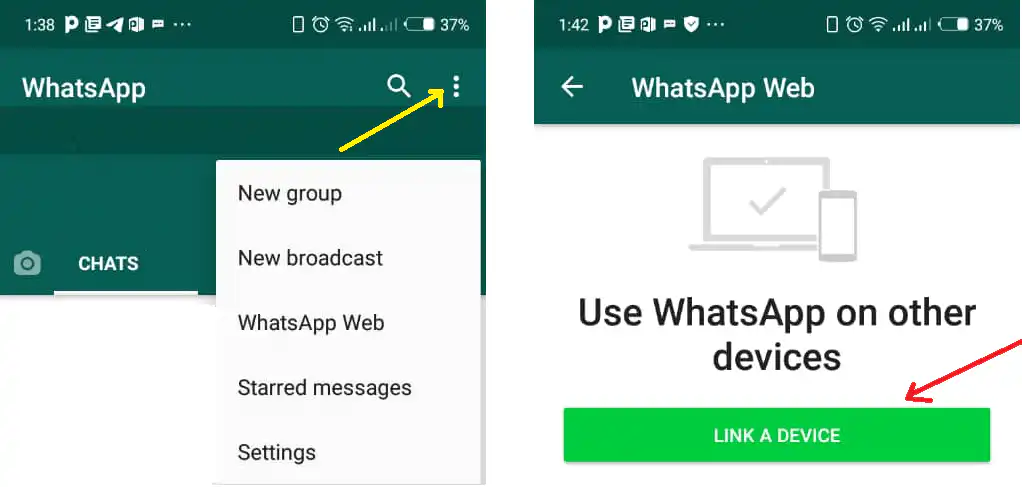
5. Click on it and select WhatsApp Web from the options.
6. This will convert your phone screen into a scanner.
7. Show the camera to the computer screen making sure you have the code captured in the scanning area.
8. The WhatsApp application would open on your computer and you can start using it.
You will be able to install Whatsapp Web on computers by following these simplified process.
FQAs: Does Whatsapp Web function like the app on the phone?
Yes, Whatsapp Web functions just like it and it easy to use as well. However, your computer internet, and that of the phone must be on for the two devices to keep communicating. If one device has no internet, you cannot use the Whatsapp Web on your computer.
Also read: SEO Marketing Strategies For Increasing Web Traffic and Revenue
With the Whatsapp web, you can chat, share files, use emojis, record voices, and do virtually everything you can when using the app on your phone.